GLM automatic workspace layout
Use it in a chat
Select ordinary GLM-5.3-Flash. Its default terminal is GLM workspace; Open WebUI selects that connection only when it is available to the current user. Users without access keep using GLM normally. The terminal can be disconnected from the cloud/terminal control beside the message box: select the checked workspace again to deselect it.
The cloud menu groups this connection under System because it is managed in Open WebUI's admin settings. Its access remains restricted to the trial user.
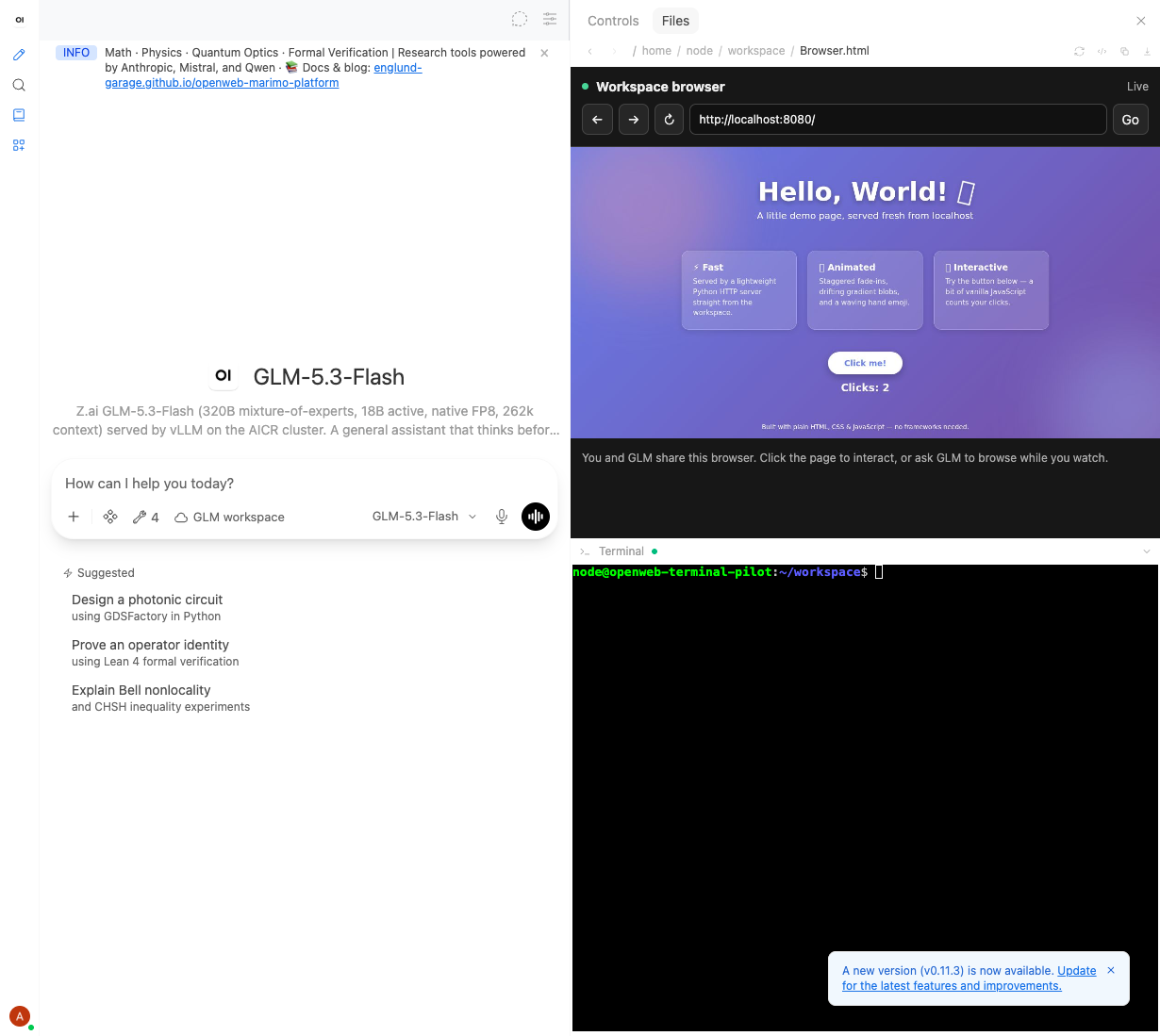
The workspace frontend opens the browser preview and expanded Bash terminal
together on desktop when a GLM chat opens, each using half the side panel's
available content height. The trial account also saves GLM as
its default model (ui.models: ["glm"]), so the landing page and New Chat use
this layout without selecting a model, terminal or file first. Explicit model
links and folder-specific model choices retain their normal precedence.
The pane previews /home/node/workspace/Browser.html, which shows the same
Chromium session that GLM controls through agent-browser. Its address bar and
viewport support navigation, clicks and keyboard input. GLM can reopen the
pane with display_file and mode="sidebar" after it has been closed. Opening
Browser.html inside Chromium would recursively display the browser itself.
This requires the pinned frontend in docker/open-webui. On an unmodified
Open WebUI installation, only the default terminal attaches; open Browser.html
in Files manually or ask GLM to display it in the sidebar.
For a saved result, ask GLM to take and display a screenshot. Screenshots remain ordinary workspace files that can be downloaded with other artifacts.
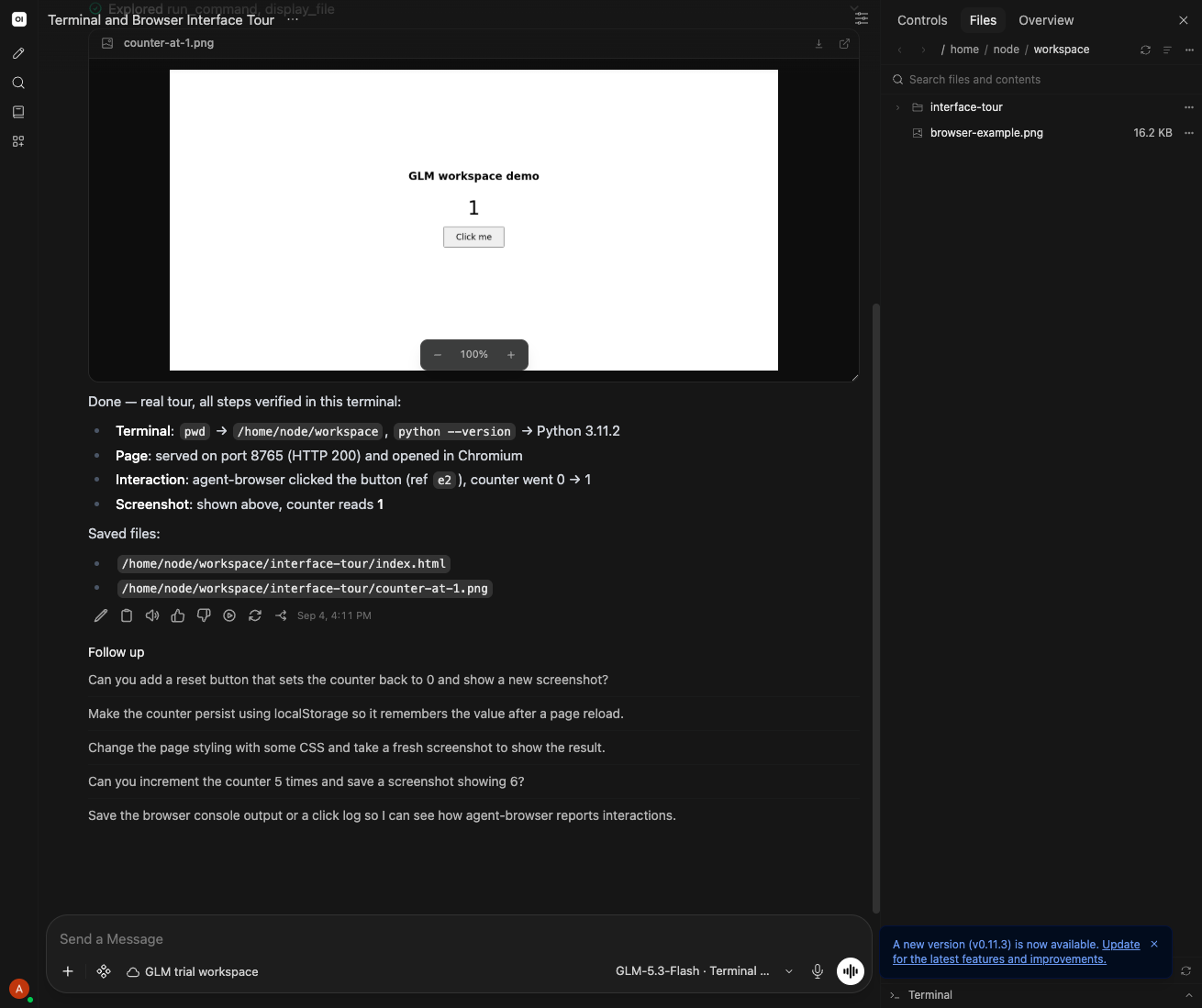
Verified on 2026-09-04: the deployed frontend opened ordinary GLM with a live browser and equal browser/terminal content heights on landing and New Chat. Closing or deselecting the workspace stayed in effect; a new chat restored it. A dragged divider persisted, switching to another model removed the workspace, and New Chat restored the account's default GLM selection.
The interactive shell starts Bash with a controlling TTY, and a terminal tool
check returned /home/node/workspace for pwd. Viewer integration checks cover
real frames, clicks, paste and Backspace, alongside authentication, input
validation, reconnect cleanup, and click-coordinate scaling.
Model and access settings
| Setting | Current behavior |
|---|---|
| Model | Existing glm, using its Open WebUI → LiteLLM route |
| Terminal capability | Enabled on GLM; disabled on other observed models |
| New model default | models.default_metadata.capabilities.terminal=false |
| GLM terminal default | meta.terminalId=glm-terminal-pilot, selected only when available to the user |
| Account's default model | ui.models=["glm"]; other users keep their own model preferences |
| Initial desktop layout | Live browser and expanded shell split the available height 50/50; 650 px side panel |
| Connection | glm-terminal-pilot, read access restricted to the trial user |
| Compute | Mac-hosted Linux VM/container, non-root user, 2 CPUs / 2 GiB |
| Workspace | /home/node/workspace, shared by chats using this connection |
| Browser | Chromium through agent-browser 0.36.0 |
| Terminal | Open Terminal 0.11.34 with a Bash/TTY wrapper |
GLM's existing tool assignments, prompt, parameters and sharing remain intact.
Native function calling is already the default; the focused sync changes only
an explicit legacy setting when necessary. Browser instructions come from the
selected terminal's /system response, so they do not replace GLM's prompt.
The extra glm-terminal alias is inactive. Its record and saved history remain;
use ordinary GLM for further messages. The focused sync never deletes a model
or rewrites a chat's history.
Model capability controls which chats offer Terminal. The connection's access grants control who can use the workspace, subject to administrator access rules. The model default does not grant access to the connection or make it public.
Layout preferences
The trial account saves showFilesOnTerminalSelect: true and
terminalFileDisplay: sidebar, so terminal attachment opens Files and file
previews use the side panel. These are user preferences, not model settings.
The workspace frontend applies meta.workspaceLayout once per chat or model
selection. Dragging either divider saves dimensions for that browser, user,
model and terminal connection; shell expansion is saved too. Closing the panel
or deselecting the workspace stays in effect for the current selection. A new
chat restores the layout. A new browser/device uses the configured defaults.
Mobile keeps the normal manually opened drawer.
The equal split follows window height until the terminal divider is dragged. That deliberate drag saves a pixel height; changing panel width or collapsing the terminal alone keeps the proportional default. Older saved heights from the initial layout do not override the new equal split.
Runtime and browser connection
workspace_server.py serves Open Terminal and the browser bridge on port 8000.
One HTTPS tunnel reaches both the native terminal API and /stream.
browser_panel.py connects the viewer to the container's local Chromium stream.
The workspace's Browser.html is a credential-free placeholder. Open WebUI's
authenticated file proxy checks connection access, then the bridge responds with
an in-memory viewer containing a one-use ticket that expires after 60 seconds.
The sandboxed preview has an opaque origin (Origin: null); the ticket, not
Origin, authenticates its first WebSocket message. The response is not cached.
Native terminal requests still require their own API key. Reconnect sends a
credential-free request to the parent preview. FilePreview checks the exact
iframe window and local Browser.html proxy path, then navigates its own existing
URL to send the app's SameSite cookie and receive a fresh ticket. It ignores
child-supplied destinations and limits reload bursts. Stock Open WebUI users
reopen Browser.html in Files instead. Streams expire after 30 minutes.
Restarting the upgraded bridge and regenerating the placeholder revokes the
original trial's permanent browser credential.
This single-user container deliberately allows browser access to local demo servers and other addresses its network can route to. It is not an egress firewall. Chromium, page scripts and terminal commands share that network; do not mount host or cluster credentials. Shared/public deployment requires network isolation. See the runtime README for the complete accepted boundary, private file handling, request limits and diagnostic logging.
The browser has its own cookies and page state inside the container. Chats that use this connection share the same files and browser session. The Mac, container and tunnel must remain running. The frontend runs in the existing Kubernetes deployment; terminal compute remains on the Mac, shared across the authorized user's chats rather than provisioned separately for each chat.
For preview servers, keep the server as the foreground command passed to
run_command, without & or nohup. Open Terminal tracks that process in the
background. Its Ports list shows listening descendants of the terminal
service; a detached/reparented process can disappear from that list.
Operate the trial
Build, run, connection setup and Browser.html generation are documented in
docker/open-terminal/README.md. That service is independently merged in
PR #570
and works with stock Open WebUI. The Docker build context is
docker/open-terminal, including terminal-info.md, which the server loads
into OPEN_TERMINAL_INFO before importing Open Terminal.
The model sync defaults to a dry run:
python3 scripts/sync_terminal_pilot.py --api-key-file /private/path/to/admin-token
python3 scripts/sync_terminal_pilot.py --api-key-file /private/path/to/admin-token --apply
It preserves unrelated fields, refuses stale writes, denies terminal access on other observed models, disables the extra alias, and verifies the effective model list before enabling GLM. It does not create a connection or handle its key. A repeat plan against the verified state should be empty.
When a quick tunnel hostname changes, update the Open Terminal connection and regenerate Browser.html for the new HTTPS origin, then reopen the preview. Disable the connection before stopping the runtime. Keep terminal keys and full rollback plans outside Git with mode 0600.
Deploy the frontend
The existing Build Container Images workflow accepts
component=openwebui-workspace to build only the pinned frontend image. The
existing Deploy Staging -> Test -> Production workflow accepts the same
component. With an empty image, it only verifies cloud access, permissions,
production version and staging isolation. With the image's Artifact Registry
digest, it checks the isolated Open WebUI staging instance before replacing
only the production openweb-ui container image. Other platform jobs are skipped.
Merge the candidate digest into the canonical production manifest before
deploying, then dispatch the workflow from main. The deployer verifies the
requested digest against both its checkout and freshly fetched origin/main,
and repeats that check after staging. Branch builds can be looked up but cannot
deploy. This keeps the canonical manifest and production on the same image.
The rollout checks health, the unchanged backend version, frontend marker and patch-specific asset version. It restores the previous immutable image on production failure, including a partly succeeded image patch, and returns staging to zero replicas. The nightly live goal detects missing or stale layout assets. Existing browser sessions need a refresh for the new frontend; verify the actual new-chat layout after deployment.
Normal deployment has a 20-minute deadline. Production recovery gets a separate 15-minute reserve; staging cleanup then gets its own fresh five minutes, including when the production recovery deadline expires. A final one-minute read reports both deployment images and staging replicas (or the exact read failure). API commands have 30-second timeouts; rollouts have a 420-second Kubernetes wait bounded by a 435-second process timeout. Recovery retries transient errors up to three times, re-reading image state before retrying image restoration. The workflow allows 55 minutes for these phases and runner setup.
Recovery can still fail or exhaust its deadline; a non-zero workflow and its final
workspace_end_state report require operator follow-up. Cleanup has an independent
reserve, but a cluster outage can prevent it too. Cancellation is not guaranteed
to finish recovery: GitHub may kill the runner
before the signal handler completes. After a cancelled/crashed run, inspect both
deployment images and staging replicas before another attempt. The read-only
probe deliberately refuses active staging, preserving another operator's work.
If the inactive staging instance was left running by this run, verify its image
against that run's log, then scale deployment/openweb-ui-staging to zero and
restore its recorded previous image. Production rollback should use the immutable
previous image recorded in workspace_image_ids, followed by rollout and health
verification. Never infer a rollback image from a mutable tag.
Open WebUI manifest-only pushes are excluded from the platform deployment filter. Changing the deployment workflow itself still triggers the normal Marimo and ChatTutor staging/production path on merge. Open WebUI promotion remains the separate, manually dispatched workspace job.
Default-terminal attachment now waits for chat and terminal discovery for every
model with a terminalId, even without a layout, and applies once per selection.
This timing change prevents asynchronous defaults from reversing a disconnect.
The native service is maintained independently. Upstream upgrades require
rebasing and retesting the patch; docker/open-webui/upstream.json holds the
shared source commit, version and runtime digest used by all build/deploy tools.
The 2026-09-04 release passed its
image build
and staging/production rollout.
That release established the original live trial from an unmerged feature
branch, leaving production ahead of the main manifest. The guarded main-only
rollout above replaces that process. Live browser checks confirmed
frontend version suffix workspace-657795e73c7c; the backend remains v0.11.2.
References: Open Terminal connection guide, agent-browser streaming, and terminal-browser, which can also drive the desktop browser beside an agent during interface verification.
The deployment's immutable digest must come from a successful build of the exact patch, including its frontend tests. Pin that digest in both canonical manifests and merge it before running the guarded staging/production workflow.
The reconnect-corrected candidate passed image build 33987842181, including all 36 frontend tests. Both canonical manifests pin openwebui-workspace@sha256:f506accf5fd21a041ab54a5f7c511fadf91f42a1ac4a9032cdab7d1499d04daf; its frontend version ends in workspace-3365d44c4c95. Real authenticated Chromium QA passed repeated reconnects, landing/New Chat, equal split, persisted resizing and per-chat opt-out using these candidate assets. Repeat those checks on the deployed image after merge.